
Give the photo a second layer
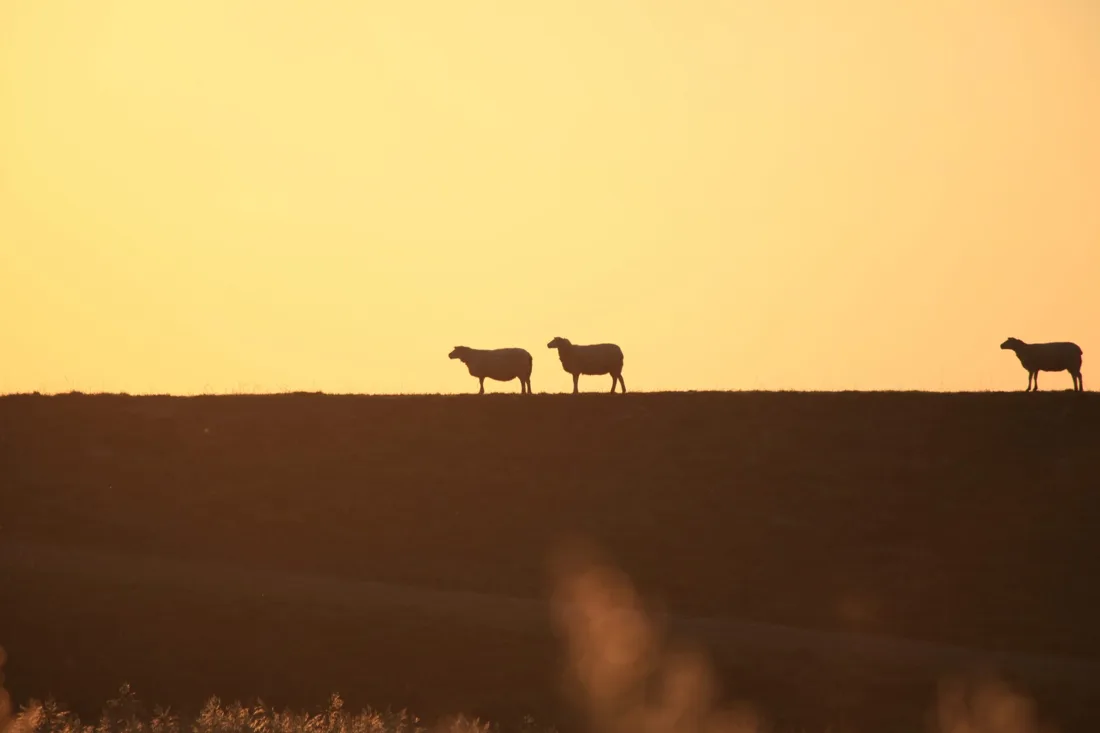
The photo above shows three sheep on a ridge at sunset. “Sheep at sunset” describes it well enough. A caption can do another job: teach someone how to make the picture, tell the story behind a choice, or invite a useful response. Decide which job you want before writing the opening line.
Three captions for the same photograph
- Teach one small technique
- “To try this silhouette, look for a ridge with clear sky behind it. Move until you can see daylight between the animals. Take one frame now and another when their shapes separate.” A photography teacher could pair this with a second frame to show the difference.
- Invite a decision
- “Would you keep the sheep at the far right, or crop the frame to leave the pair alone? I’d keep all three because the gap makes my eye travel across the ridge.” Readers have a specific choice to discuss, and the photographer has contributed an opinion first.
- Start a conversation about a class
- “Which part of photographing at dusk would you like to practice: exposing for the sky or finding a clean outline? I’m choosing the exercise for our next photo walk.” This opening fits a teacher who can use the answers to plan a real lesson.
Adapt the idea to a business post
For a baker posting a cut loaf, start with the detail a customer might miss: “Those wide holes make this slice good for dipping oil.” Then give the useful fact you know from your own bake. If the goal is a shop visit, finish with the verified pickup time and location. A question at the end is useful when you actually want an answer.
Edit before you publish
Read the first line beside the photo. Cut anything the picture already says unless it helps orient the reader. Read the ending on its own and check that someone could act on it. When comparing engagement, keep a note of the replies or inquiries your caption was written to earn.
Read the caption beside the photo’s alt text. Someone listening to both should hear what the image shows and why you chose to share it.
Write three openings while the photo is in front of you
Look at the sheep on the ridge. Start with a detail only the photographer could explain: “I waited below the crest until there was a gap between the last two sheep.” That opening teaches someone how the silhouettes became legible. A second opening might start with the decision: “At first I framed the whole field. The picture got quieter when I left most of it out.” The third might address someone choosing a print: “Stand back from the screen and see when the three shapes become one line.”
Each opening sets up a different second sentence. The teaching version can explain where the photographer stood. The story can describe why the wider composition distracted from the ridge. The print version can explain how to judge the image at viewing distance. If your second sentence could follow any photograph on your profile, you have probably lost the detail that made the opening interesting.
Write for the person who can act on the post
A photographer posting for other photographers might give the lens choice or the reason for keeping the bright sky. A shop selling a print should give the customer the information they would need before asking about it. Is the print available in the size shown? Does the photograph include a frame that is sold separately? If you know the answer, put it beside the offer. If you do not, check with the person fulfilling orders before posting.
Read the ending from the reader’s point of view. “Let me know” can mean several things. A question such as “Would you hang the dark ridge against a light or dark wall?” is easy to answer and could guide the next photograph. If the next step is ordering, state where someone can find the current size options. Asking for a comment, a share and a purchase in the same ending leaves the reader to choose the purpose of the post for you.
Turn a generic draft into a useful caption
Take “Beautiful sunset, grateful for moments like these.” Keep it if it sincerely says everything you want to share on a personal post. For the photography lesson, try giving the reader an experiment: “Move a step to one side until you can see a sliver of sky between each animal. Look again before you press the shutter.” The reader can now try something on the next walk. Use the photograph’s alt text for the visual description, especially if the composition matters to the lesson.
How do I caption my picture?
Say what someone would miss from the picture alone. Add the one fact, decision or story that you can stand behind. Read it next to the actual crop on your phone. If it sends the reader looking for a detail you cropped out, change the picture or the sentence.
How do I write a unique caption?
Keep notes at the time of making the work. A baker can record why the dough needed another fold. A printmaker can note which ink changed when it dried. Those observations are harder to substitute with generic language and easier for the person who did the work to verify.
Twelve caption starts you can adapt to real photographs
1. Explain the choice behind a landscape
“I stepped downhill until the ridge hid the fence. That left three separate silhouettes against the sky.” Use this kind of opening when one physical choice explains the finished picture. Follow it with a detail another photographer can test, such as watching where the outlines of two animals meet. If the photograph was taken on private land, avoid sending readers onto a route they cannot use. The useful lesson is the change in viewpoint.
2. Give a photograph a sense of scale
“This vase fits on the narrow shelf beside our till. Here it is next to an ordinary postcard.” Scale is difficult to read in a tightly cropped product photograph. A familiar object can help a buyer make a first comparison, but supply the verified dimensions when the fit matters. Check the final photograph before referring to the postcard. If it was cropped out, name the measurement instead. The caption has to work with the version people actually see.
3. Describe the step just outside the frame
“The tray spent its last few minutes on the lower shelf. That is where the base picks up the color you can see on the cut slice.” A process caption can explain something the final shot conceals. Verify the detail with the baker who made that batch. A general recipe tip is a weaker fit if the picture shows a different method. The strongest second sentence gives a reader one specific thing to look for in the photograph.
4. Write a useful local announcement
“Saturday pickup is at the courtyard door while the main entrance is being painted. Look for the sign beside the blue gate.” Add the confirmed collection window and an accessible way to ask about the route. Check the day and date together. A photograph of last month’s entrance can remain beautiful while sending people to a locked door. Remove or update time-sensitive language when you reuse the image. A post about where to go has succeeded if a customer can find the place.
5. Let a customer question organize the caption
“Can a signed shirt sit flat inside a deep frame? This is the space we leave between the fabric and the glass.” Follow with the visible detail that answers the question. A side-on photo is more useful here than an attractive front view. If the customer’s object is distinctive, get permission before sharing the image or the story. You can teach the technique with a demonstration piece when showing a commission would reveal more than the customer intended.
6. Compare two materials without declaring a winner
“The print on the left catches the desk lamp. The matte paper on the right keeps the dark ridge visible from this chair.” Name the conditions of the comparison. The reader can now decide whether those conditions resemble their own room. If you move the lamp or change the camera angle between photographs, say so. A statement that one material is simply better leaves out the most useful piece of information: better for which room and which viewer?
7. Ask for input while a decision is still open
“We are choosing between the wide handles in the first photo and the narrow ones in the second. Which would be easier to hold with gloves on?” Explain how the answer will be used. If the run has already been manufactured, tell the story as a retrospective instead. People are more likely to offer thoughtful feedback when the question describes a real decision. Return later with the chosen design and what the maker learned from the replies.
8. Credit a collaborator precisely
“The florist chose the stems. The ceramicist shaped the two neck widths. We kept the bouquet the same so you could see what the vessels changed.” This caption gives both partners a recognizable contribution. Ask them to check the account names and the description of their work. A vague “thanks to everyone involved” misses the reason the two accounts appear together. If customers can order the vase and flowers separately, say where each inquiry belongs.
9. Tell a short story about a mistake
“The first shadow box was too shallow. With the lid in place, the medal touched the glass. We added depth and photographed the clearance from the side.” A mistake earns its place in a caption when the reader can see how it was caught and what changed. Avoid identifying a customer who did not agree to be featured. Use details from the actual work and leave room for the reader to inspect the correction in the photograph.
10. Write a caption for a portrait or selfie
“This is where I check the glaze samples before opening the kiln. The tiles on the left are the ones I compare under daylight.” The photograph tells the reader who is present. The caption tells them why this spot matters. If the subject is another person, give them the chance to check their name, role and preferred credit. A personal photograph can still teach something without turning a person’s private day into a marketing story.
11. Announce availability without overpromising
“These two framed prints are ready for collection on Saturday. The larger size in the final picture is a display sample.” State the information a buyer needs to distinguish what is shown from what is available. If availability changes quickly, point to the place where it is kept current and assign someone to check it. A clear stock note is often more useful to a potential customer than a dramatic opening line about scarcity.
12. Close a series and invite the right next question
“Here is the finished print beside the original sketch. The wider strip of sky was the change that made the ridge readable from across the room.” Remind the reader what the series set out to show. If you want a response, ask which part of the process still needs a demonstration. A question about mixing the second ink gives you material for a specific follow-up. A request to “comment below” does little to help a reader decide what to say.
Edit a caption for different tones
Start with the same factual core and change the timing of the line. For the ridge photograph, a quiet caption might be, “Three small outlines were enough. I left the rest of the field outside the frame.” A more playful caption could read, “Two sheep held the pose. The third took its time.” The second version works only if it matches what happened. Do not invent a behind-the-scenes moment just because the sentence has better rhythm.
For a teaching caption, show the reader what to repeat. For a portfolio caption, identify the work clearly enough for a buyer to refer to it later. For a personal caption, keep the observation in the photographer’s own voice. A long list of clever lines is most useful as a prompt to notice your own material. Read the draft aloud. If the person who made the work would never say it, choose simpler words.
Size the caption to the job
Write the shortest version that still answers the question. “Collection at the courtyard door until noon on Saturday” can be a complete caption for a clear photograph of the door. A comparison of two printing papers needs more room because the lighting conditions affect the result. A story about waiting for the sheep needs enough detail to make the final moment intelligible. Length is a decision about what the reader needs, not a universal setting.
For a longer caption, put the useful fact or question near the beginning and use short paragraphs for changes of subject. Separate practical details from the story when someone may need to look them up again. When the location or price matters, check it against the current source before publishing. Reading the post later should be enough to tell which details were true for that photograph and which ones may have changed since.
Keep a small bank of ideas tied to actual images
After a shoot, give each photograph a working name and add a sentence about something the camera did not capture. For the ridge it might be where you stood. For the mug it might be why the paper wrapped around the handle first. For the workshop it might be the question beginners ask when they see the unfamiliar tool on the bench. Later, when it is time to write, you have observations you can check rather than an empty page and an abstract instruction to be engaging.
Keep the approved caption alongside the selected crop. If you swap the image while scheduling, read the caption again. Left and right can change, a second object can disappear, and the expression on a person’s face can tell a different story. This small check also helps the person writing alt text describe the image that will actually appear.
Check the caption in the publishing screen
Start a photo post, select the final crop and continue to the caption field. Paste the approved text, then read the first line again alongside the image. Check any account mention against the account it opens. If you have just changed the photograph, revisit its accessibility description as well. Save a draft while waiting for an approval and verify the published version when it is shared. The text in a planning document and the text a viewer actually sees can diverge during the final edit.
Check an instruction with someone who has never visited
Hand the caption and photograph to a person who has not been to the shop. Ask them to explain where they would go, what they would bring and when they would arrive. Do not tell them the answer you intended. If they correctly name the blue gate but think pickup is on Sunday, the photograph is doing its job and the date needs attention. If they know the date but describe the wrong building, improve the picture or the landmark in the caption.
You can adapt the same test to an online offer. For a downloadable pattern, ask someone what they think they will receive and where they will find it. If the caption shows a finished bag but the purchase is the pattern, say that early. A concrete expectation prevents a far more difficult customer conversation after checkout. The test takes less time than writing three alternative captions from scratch and gives a precise reason for any revision.