
Add a description to an Instagram photo
Prepare your photo post and open the additional options on the final sharing screen. Look under accessibility for the alt text field. Write the description, save it, and return to the post. For a carousel, select each photo and describe that slide. For a photo already published, open its menu, choose Edit, and look for the alt text control on the image. Texas Tech’s illustrated mobile walkthrough.
Describe the detail the reader needs
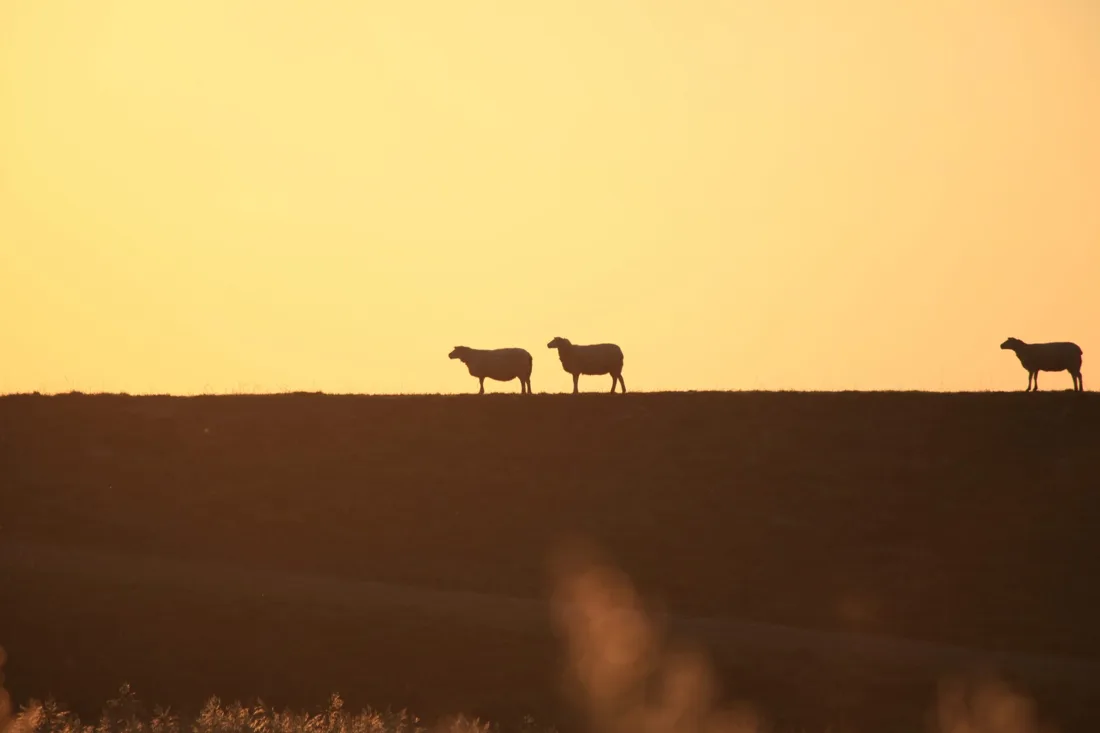
Look at the landscape photo above. “Sheep” identifies the subject but loses the arrangement that makes this particular photograph work. “Three sheep in silhouette stand along a dark ridge beneath a yellow sky” lets a reader picture the contrast and spacing. The location and breed would be guesses. Leave them out unless the photographer can confirm them and they matter to the post.
The caption can tell the story of waiting for the third sheep to step into the frame. Put that anecdote there so a screen reader user gets the visual information first and can then hear the same story as everyone else. Use the photo caption examples to decide what each piece of text should do.
Write a different line for each slide
For a ceramics shop showing how it packs a mug, write down what changes as you swipe. Try these descriptions with the packing sequence in the carousel guide.
- A speckled ceramic mug sits upright on the workbench with its handle visible.
- Two hands fold brown paper around the mug, covering the rim.
- The wrapped mug rests inside a cardboard box surrounded by paper cushioning.
Read the descriptions in order without looking at the pictures. Can you follow what happened to the mug? If a slide contains opening hours, a price, or directions printed as text, include the details a viewer needs. Keep promotional phrases in the caption. They take up listening time when the reader is trying to understand the photograph.
Decide which visual fact carries the meaning
Start by asking why this picture appears in this post. In the landscape example, the relationship between the three sheep and the ridge is the subject. In a product listing for a framed print of the same picture, the visible frame and the relative position on the wall might also matter. You can describe both accurately without inventing the breed of the animals, the location or the time of day. Use concrete nouns and positions that a reader can put together.
Try a listening test. Close the image and read the draft aloud. Can a listener tell whether the sheep stand together in a cluster or appear apart along a ridge? Is the sky an important part of the contrast? If your first sentence consists mostly of “beautiful,” “amazing” and “stunning,” replace one adjective with the fact that prompted it. Someone listening can form their own impression when you give them the visual evidence.
Describe a sequence without repeating yourself
In the packing carousel, the reader knows after the first slide that the object is a speckled mug. On the second slide, put the change first: two hands fold paper around the handle. On the third, the wrapped mug sits inside the box with cushioning around it. Repeating the product name, shop name and offer on every slide forces someone to listen through the same words before reaching the new information.
If a diagram contains text that a buyer needs, include those words in the description or in accessible post text. A sign reading “pickup at the side door” matters to a person collecting the mug. The brand printed on an incidental piece of tape probably does not. When a slide has extensive instructions, put the full instructions in the caption as well, where people can revisit them.
Review the description before and after publishing
Check each image in the composer separately. After sharing, reopen the photo’s edit view when you need to correct a description. Look for a swapped sequence: the description of the packed box should not be attached to the unwrapped mug. Compare the description with the final crop rather than the original high-resolution file. A detail visible on your desktop may be missing from the published image.
What should I write in alt text on Instagram?
Describe the parts of this photograph that matter to understanding this post. For the ridge photograph, the subjects, their spacing and the contrast with the sky carry the idea. For a workshop arrival photograph, the entrance and visible signs would matter more than the weather.
How do I add alt text to a photo?
On the final sharing screen, open the additional options and find the accessibility controls for photo descriptions. Write and save a description for each relevant slide. Existing photos can be edited through their post menu. Illustrated Instagram accessibility steps.