
Choose a question that needs more than one photo
An Instagram carousel groups a sequence of images or videos in one post. It works well when a reader needs to compare details, follow a process, or pause on a reference. If a single picture answers the whole question, use it on its own.
Build a three-slide story
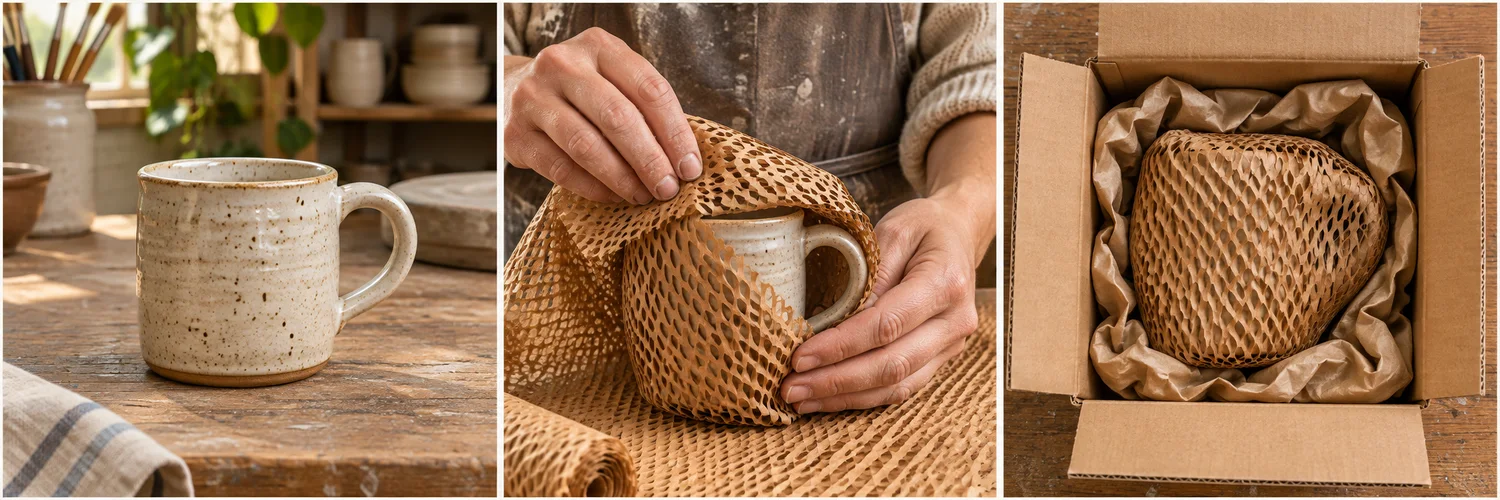
In the pottery example above, the customer wants to know how a handmade mug will arrive. Each photo answers a different part of that question.
- Start with the object. Show the finished mug with the handle in view. A cover line such as “How we pack your mug” gives the reader a reason to swipe.
- Move closer for the detail. Show hands wrapping the mug. Explain what the viewer can see about the paper and its position around the handle.
- Finish with the result. Show the wrapped piece seated inside the box. A customer can now picture the parcel they’ll open. Save shipping times and other order terms for your current shop information.
Three carousel ideas to try next
A side-by-side choice. A nursery can show two plants on the same windowsill, followed by a simple guide to which light each needs. Photograph both from the same distance.
A common mistake. A tailor can show a twisted seam, the detail that caused it, and the corrected finish. Use a close-up where the difference would otherwise be hard to see.
A reference customers can save. A framer can show three mat widths around the same print. Put the measurement on each slide so it remains useful when viewed on its own.
Check it at phone size
Read the cover at a glance, check that each crop keeps the important detail in frame, and describe the visual difference in the caption or image description. Ask someone to swipe through once and tell you what they learned. Their answer will show you which slide still needs work. If the pictures explain the process but leave out how to order, use these caption examples to write a closing line. If another maker contributed to the demonstration, agree on credit and approvals before inviting them to a co-authored post.
Make a paper version before opening Instagram
Lay three index cards on the bench. On the first, write what the buyer wants to know before ordering a fragile mug. On the second, write the one packing detail that answers their concern. On the third, write what they should see when they open the box. If two cards say the same thing, remove one or change the photograph. A sequence earns its length when each swipe tells the reader something the previous slide could not.
For the cover, photograph the upright mug beside the open box. For the middle, frame the hands folding padding around the handle. For the last slide, photograph the protected mug inside the box before sealing it. Use the same mug all the way through. A sudden change of glaze can make a buyer wonder whether a different product needed different packaging.
Crop for the information at the edges
Preview all three images at the size you expect a reader to see on a phone. The handle is the most important detail in the packing photograph. If the crop cuts off where the padding meets it, moving the lettering will not solve the problem. Take a wider photograph or move the hands before shooting again. Keep important text away from the border, and check the legibility of any small label after exporting.
If you add instructions to a slide, write one action per image. “Fold the paper across the handle” can sit beside a photograph of that fold. Several lines about box sizes, shipping schedules and pickup hours will pull attention away from it. Put ordering details in the caption or at the destination where they can be kept current.
Assemble the post and verify the order
In Instagram’s post composer, choose the option to select multiple items and select the mug, wrapping and boxed-mug photographs in sequence. Inspect the ordered preview before sharing. Add a distinct description for each slide. Read the caption after swiping through the full sequence. If it says “in the next picture” without naming the part of the mug, someone listening to the post can lose track of what is changing.
Have a second person start halfway through the preview. Can they identify the object and tell what happens next? This catches an easy mistake: a beautiful close-up of brown paper can look like almost anything if the mug is completely out of frame. Leave enough of the rim or handle visible to orient the reader.
What should the next carousel cover?
Write down the question that remains after the last slide. A buyer might understand packing but still ask whether the mug fits a particular shelf. That is a new comparison. Show the mug beside a ruler, on a normal shelf and beside another model. Do not quietly change the object or measurement system between slides. A follow-up earns a place on the profile because it answers a second purchase question.
How do I post a carousel on Instagram?
Prepare several related photos or videos, start one feed post and select multiple items. Review the sequence, caption and accessibility descriptions before sharing. If one photograph answers the entire question, publish that photograph on its own.
Do carousels reach non-followers?
Treat discovery as an outcome to observe. Compare reach and relevant profile activity in your own account after publication. A multi-slide format alone gives no reliable prediction of how many new viewers will see the post.
Check the cover separately from the sequence
A customer may first see the cover in a grid beside other product photographs. Preview it as a small tile. Does it look like a mug for sale or like a tutorial about wrapping a mug? Either is a legitimate choice, but they create different expectations. The first line of the caption can settle the question if the cover needs to serve both purposes.
Save a copy of the final export in its swipe order. Give the files names such as mug-on-bench, paper-around-handle and mug-inside-box. If someone schedules the sequence later, they can identify a reversed pair without opening every file. Check the finished post once more on a phone, including the description on the middle slide.
Before exporting the cover, shrink it to the size of an ordinary phone thumbnail. Ask someone to identify the object and the question without reading the caption. A cover that depends on the small label beside the mug needs a closer crop.